
You do not need to hire a developer. You do not need to learn HTML, CSS, or JavaScript. If you want to build a landing page, no code required, you can have a professional looking page live on the internet before lunch today. This tutorial walks you through exactly how to do it, step by step, using tools built for people who have never touched a line of code in their lives.
By the end of this guide, you will have a real, published landing page that collects leads, promotes your offer, or gets people to take one clear action. Let us get started.

What Is a Landing Page and Why Does It Matter?
A landing page is a single web page built around one goal. That goal might be collecting email addresses, selling a product, booking a call, or promoting a free download. Unlike a full website with multiple menus and pages pulling visitors in different directions, a landing page strips everything back to one message and one action.
That focused design is exactly why landing pages convert so well. A well-built landing page can convert between 5% and 15% of visitors into leads or customers. A typical homepage converts less than 2%. The difference is focus.
For a new entrepreneur, a landing page is often more valuable than a full website at the start. You can launch your idea, test your message, and start collecting leads within hours, not weeks.
Key takeaway: A landing page does one thing. That singular focus is what makes it powerful.
What You Need Before You Start (10 Minutes of Prep)
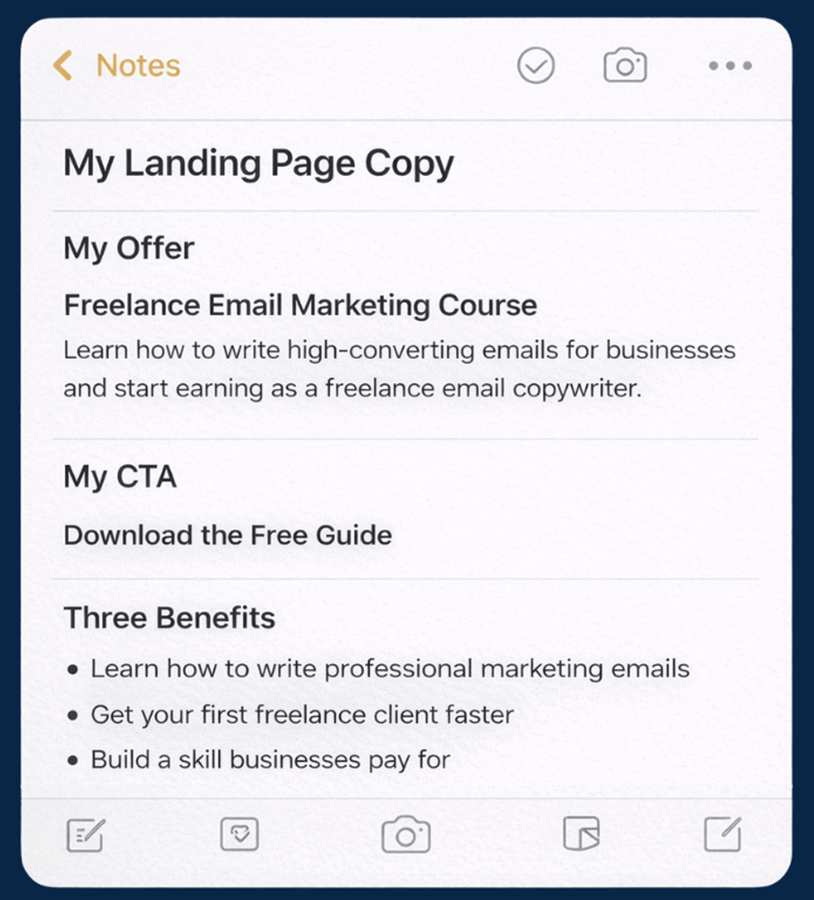
Before you open any tool, spend 10 minutes getting clear on three things. Skipping this step is the number one reason beginner landing pages fail to convert.
1. Your offer in one sentence. What are you giving people and why should they care? Example: “Get my free 5-day email course that teaches freelancers how to land their first client.”
2. Your call to action (CTA). A CTA is the button or form that tells visitors what to do next. It should be one action only. Examples: “Download the Free Guide,” “Book a Free Call,” or “Join the Waitlist.”
3. Three bullet points of proof or benefit. Why should someone trust you or want what you are offering? These do not need to be fancy. They just need to be true and specific.
Write these down in a notes app or on paper before you touch a builder. Having this copy, meaning the text on your page, ready before you build will cut your build time in half.
Key takeaway: Your words sell the page, not the design. Know your message before you build.
How to Build Landing Page No Code Needed: Choose Your Tool
There are dozens of tools available, and most will do the job. The key is picking one that matches where you are right now, not the most powerful tool on the market.
Here is a comparison of the most beginner-friendly options:
| Tool | Free Plan | Best For | Learning Curve | Paid Plans Start At |
| Carrd | Yes (3 sites) | Ultra-simple pages, personal brands | Very Low | $9/year |
| Mailchimp | Yes | Email list building, simple lead pages | Low | $13/month |
| Kit.com | Yes (up to 10,000 subs) | Creators, email-first pages | Low | $25/month |
| Systeme.io | Yes (unlimited pages) | Full funnel, beginners who want room to grow | Low-Medium | $27/month |
| Webflow | Yes (limited) | More design control without code | Medium | $14/month |
For this tutorial, we will use Carrd for a simple one-page lead capture site and Systeme.io if you want a full funnel with email automation built in. Both are genuinely beginner-friendly and both have free plans that let you publish a real page without spending anything.
If you are already using WordPress, skip ahead to the WordPress section below.
Key takeaway: The best tool is the one you will actually finish using today. Start simple.
Step-by-Step: Build Your Page Using Carrd (45 to 60 Minutes)
Carrd is one of the fastest ways to go from zero to a published landing page. It is minimal, clean, and designed for exactly this use case.
Step 1: Create Your Free Account (5 Minutes)
Go to carrd.co and click “Choose a Starting Point”.

Step 2: Choose a Starting Template (5 Minutes)
Carrd will show you a template library. Filter by “Landing Page.” Look for a template with a headline, a short description area, and a button or form. Do not overthink this. The template is just a starting point. A good choice for beginners is the “Solid” template: clean, one column, and easy to edit.
Click the template to preview it, then click “Use This” to load it into the editor.
Step 3: Edit Your Headline and Subheadline (10 Minutes)
Click on the main headline text. Delete the placeholder and type your real headline. A strong landing page headline does two things: it names who the page is for and what they will get.
Example formula: “[Specific Result] for [Specific Person] Without [Common Pain]” Real example: “Get Your First Freelance Client in 30 Days Without Cold Calling”
Then click the subheadline and add one sentence that supports the headline. Keep it to 15 words or fewer.

Step 4: Add Your Three Benefit Bullets (10 Minutes)
Click on the text block element and replace the placeholder content with your three benefit bullets. Format them like this:
- What they get: The specific thing you are delivering
- Why it helps: The outcome it creates for them
- How fast or how easy: A time or simplicity promise if you have one
Real example using the freelance course offer:
- Learn the exact outreach script that landed 3 clients in one week
- Works for complete beginners with no portfolio or prior experience
- Takes less than 30 minutes per day to implement
Step 5: Set Up Your Form or Button (15 Minutes)
Click the “+” button in the editor to add a new element and choose “Form.” Carrd creates a basic form with name and email fields. Remove the name field and keep only the email field. Fewer fields always produce more signups.
Connect your form to an email service using Carrd’s integration settings. If you have a Mailchimp or Kit.com account, connect it here so new subscribers go directly into your email list. If you do not have one yet, Carrd can email you a CSV file of signups, which works fine to start.
If your goal is to send people to a booking link or sales page, use a button element instead and paste your destination URL into the link field.

Step 6: Upload Your Image (5 Minutes)
A clean headshot taken in good natural light works well for personal brands. If you are promoting a product or guide, a simple mockup, meaning a digital cover image, adds visual credibility. Free mockup tools like Canva let you create an ebook or course cover in minutes. Free stock photos from Unsplash or Pexels work for background images.
In Carrd, click any image element and use the “Replace” option to upload your file.
Step 7: Publish Your Page (5 Minutes)
Click “Publish” in the top right corner. On the free plan, your page publishes to a carrd.co subdomain such as yourname.carrd.co. This is a real, live, shareable URL. You can upgrade later to connect to a custom domain like yourbusiness.com.
Share the URL now. Your landing page is live.
Key takeaway: Carrd gets you from blank screen to published page in under an hour. Focus on your words, not perfect design.
Step-by-Step: Build Your Page Using Systeme.io (60 to 75 Minutes)
If you want email automation, an opt-in sequence, or a basic sales funnel included from day one, Systeme.io is the best free option available. It takes slightly longer to set up but gives you significantly more capability.
Step 1: Create Your Free Account
Go to systeme.io and sign up. No credit card required. The free plan includes unlimited landing pages, 2,000 email contacts, and basic automation.
Step 2: Start a New Funnel
Inside your dashboard, click “Funnels” then “Create.” Choose “Collect leads” as your funnel type and name it something recognizable, like “Freelance Course Waitlist.” Systeme.io will build a two-step funnel: a landing page and a thank-you page.

Step 3: Edit the Landing Page Template
Click “Edit Page” on the first step to open the drag-and-drop editor. Click any section to edit it. Replace the headline, subheadline, and bullet points with the content from your prep notes.
Step 4: Set Up Your Welcome Email
Go to “Emails” in your dashboard, create a new campaign, and connect it to your funnel. Write a short welcome email and set it to send immediately after someone signs up. Even a single automated welcome email significantly increases the chance your new subscriber opens and uses what you sent.
Step 5: Publish and Test
Click “Save” then “Preview” to see your page as a visitor would. Fill in the signup form using a test email address to confirm the automation sends correctly. Then click “Publish.”
Key takeaway: Systeme.io takes a little longer to set up but delivers a full marketing system, not just a page.
Adding a Landing Page to WordPress (45 Minutes)
If you already have a WordPress site, you do not need a separate tool. Free plugins like SeedProd Free add a drag-and-drop landing page builder directly inside WordPress, and it is designed specifically for this purpose.
To set up a landing page in WordPress using SeedProd:
- Install and activate SeedProd from the WordPress plugin directory
- Go to SeedProd in your dashboard and click “Add New Landing Page”
- Choose a template and enter the visual editor
- Replace placeholder text with your content and connect your email form
- Publish the page from within SeedProd
Your page will have its own URL within your site, for example yoursite.com/free-guide, and you can link to it from anywhere.

To understand how a landing page fits into your broader site structure, read our guide on WordPress Navigation Menus: Set Up Your Site Structure for Users and SEO.
Key takeaway: If you already have WordPress, a single plugin is all you need to build a landing page today.
The 5 Elements Every High-Converting Landing Page Needs
Whether you use Carrd, Systeme.io, or WordPress, your page needs these five elements to convert visitors into leads or customers.
1. A clear, specific headline. Vague headlines kill conversions. “Welcome to My Business” tells no one anything. “Get Booked Solid in 60 Days: The Freelance Starter System” tells them exactly what to expect and who it is for.
2. A single call to action. One button. One form. One next step. Every extra option you add reduces the chance someone takes the one action you actually want.
3. Social proof. This can be a testimonial, a number such as “Trusted by 400 small business owners,” a media mention, or a short personal credibility statement. New entrepreneurs often feel they lack proof, but a beta tester result or a specific personal experience counts.
4. Benefit-focused bullet points. Features describe what something is. Benefits describe what it does for the reader. “24 video lessons” is a feature. “Learn at your own pace with short lessons under 10 minutes each” is a benefit.
5. No navigation menu. Remove your site’s main menu from your landing page. Navigation gives visitors an exit route before they convert. A true landing page keeps them focused on one decision.

Key takeaway: A landing page with all five of these elements will outperform a beautiful page missing even one of them.
How to Get Your First Visitors (Do This Today)
A published page with no visitors does nothing. Here are three free ways to drive real traffic on the same day you publish.
Share it directly. Post your landing page URL in your social media bio, send it to your existing contacts via email, and share it in relevant online communities like Facebook Groups or LinkedIn where your target audience spends time.
Add it to your email signature. If you send 10 emails a day, that is 10 daily opportunities for someone to click your link and sign up.
Run a small paid ad. A $5 per day budget on Facebook or Instagram can generate meaningful traffic to a targeted landing page. Before you spend money on ads, make sure you understand who you are targeting. Our guide on Competitor Analysis for New Businesses: Research Before You Build will help you research your market first.
Key takeaway: Publishing is step one. Getting eyes on the page is step two. Start with free traffic before you pay for it.
Frequently Asked Questions
What to Do Next
You have the knowledge. Here is exactly what to do in the next two hours.
Step 1: Write your copy first. Open a notes app right now and write your headline, subheadline, three benefit bullets, and your call to action. Ten minutes of prep saves an hour of confusion inside the builder.
Step 2: Pick your tool and build your page. Use Carrd for the fastest launch. Use Systeme.io if you want email automation included from day one. Use SeedProd if you already have WordPress. Follow the relevant section of this guide step by step.
Step 3: Publish and share immediately. A live page that converts 5% is better than a perfect page that never launches. Share your URL in at least three places today: your social media bio, one online community, and your email signature.
Step 4: Grow your offer. Once your landing page is collecting leads, your next step is building out the systems behind it. These WNS guides will take you further:

